14 days free · Nothing to download — it opens in the browser you are holding · No card at sign-up. Nothing is charged.

Free · no sign-up · nothing to download

CALCULATE MILES, FUEL
AND TOLLS BEFORE
YOUR NEXT LOAD.
IS IT A NO OR GO?

Free, no sign-up, no card.

All miles—
Fuel cost—
Rate per mile—
Left after fuel & tolls—
—

Rate per mile counts the deadhead, because the deadhead counts against you. Most loads look better before it is in.

Want this sent to you?

Leave an email and pick what you want. No spam, and you can stop it any time.

For drivers & owners. Built by drivers & owners.

No more spreadsheets.
No more missed payments.

Dispatch, fleets, drivers and owner-operators. Book it, dispatch it, track it, settle it, bill it — loads, trucks, brokers, detention and documents in one place, and the weekly settlement writes itself.

The calculators above need no sign-up. Nothing to download — it runs on your phone, your tablet and your laptop, and your records follow you across all three.

No morespreadsheets
One placeloads, trucks, drivers, money
No downloadruns on any phone or laptop
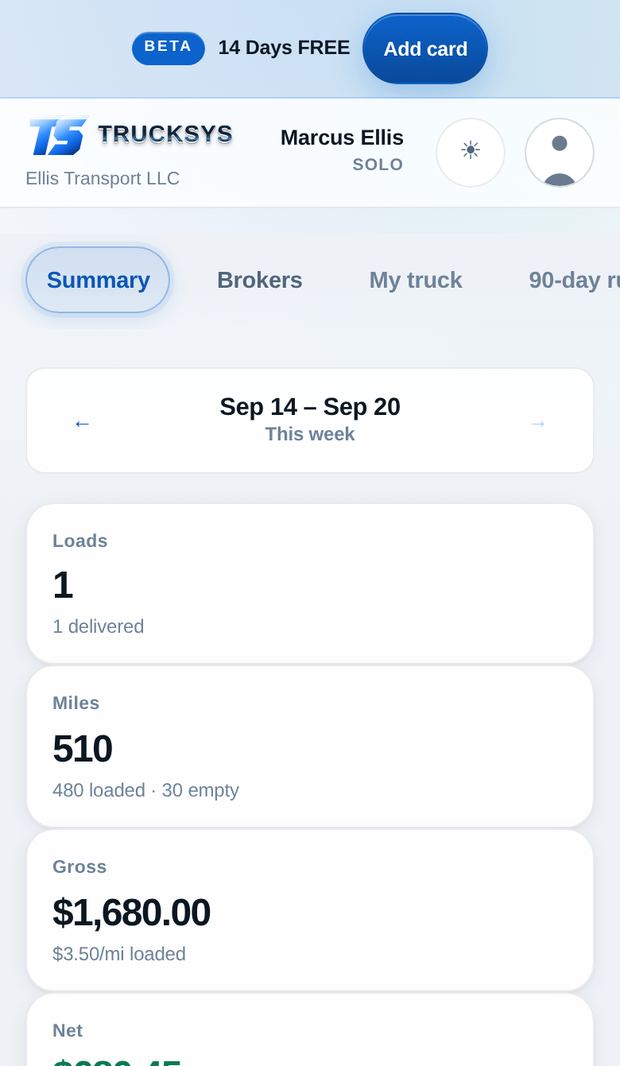
A week in Trucksys — loads, miles, settlement and what the week actually kept
$0Both calculators, no sign-up, no card
$29 a monthThe nearest fleet TMS starts at $300
14 days freeNo card at sign-up. Nothing is charged.
Unlimited exportsEvery settlement and invoice as a PDF, as many as you like
No download neededOpens on any phone, tablet or laptop
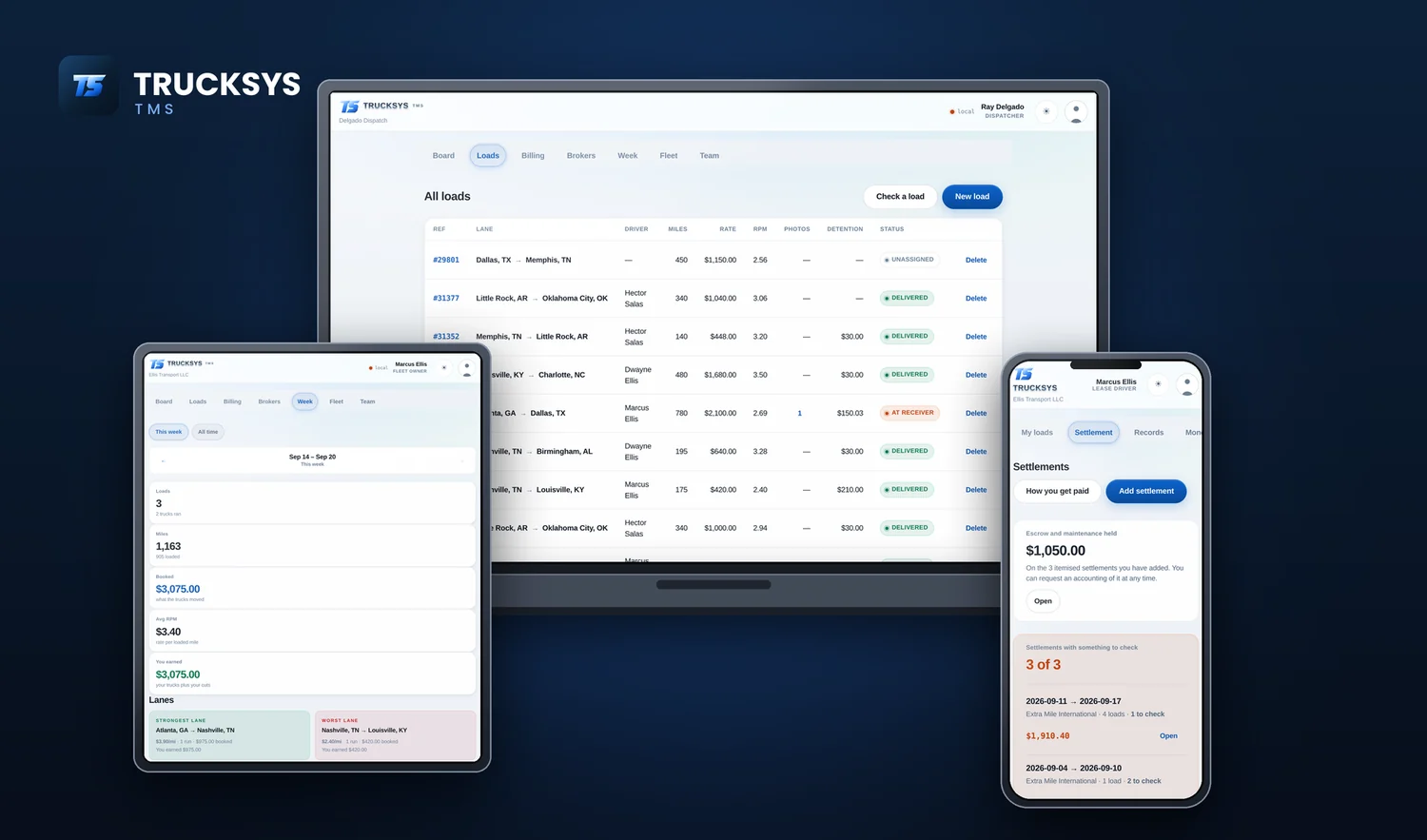
Trucksys open at once on a laptop, a tablet and a phone - the dispatcher's load board, the week's miles and lanes, and a driver's settlements

What’s your role?

Select the position that best describes your role with the company. Your selection helps us customize your TMS experience and show you the tools that matter most to your day-to-day operations.

Dispatch services & fleets

Other people’s trucks, run like your own book

One truck you own and ten you book for somebody else is the same week seen from two sides. The app knows which trucks are yours and which are not, and never counts the wrong money as yours.

Owned, leased on, or dispatched — marked once

Say whose truck it is when you add it, and every screen after that gets it right. The whole rate on your own truck; only your cut on everybody else’s.

  • Carriers kept as records, with your rate set per carrier
  • A rate on one truck overrides its carrier, because one deal is always different
  • Billing splits into Owned and Dispatched, so you never invoice a broker twice
  • Your settlement week starts on whatever day yours actually starts
The fleet list showing which trucks are owned, leased on and dispatched

Which truck, which carrier, which lane

The week broken out three ways, worst first — because the one at the top is the one worth a phone call this morning.

  • Gross, loaded miles, rate per mile and what you earned, per truck
  • The same again per carrier, so a bad payer cannot hide behind a good one
  • Your strongest lane and your worst, averaged across every run
  • Running totals that keep going — the gross never resets

A lane has to run twice before the app calls it a lane. One good load is not a market.

The week broken out by truck and by carrier, worst rate per mile first

The statement that goes back to the owner

At the end of your week, every truck you run gets a statement: what it grossed, what came off it, and what is owed — on your letterhead, ready to send.

  • Every load on the truck, with the rate and the miles behind the total
  • Your percentage shown as the figure it actually resolved to
  • Print it, save it as a PDF, or mark it sent and move on
  • As many as you need, every week, for as many trucks as you run
A weekly statement for a dispatched truck

The reason most drivers try it

Get paid for every minute you sit

You hit the dock, the clock starts, and two or three hours later nobody remembers when you got there except you. Trucksys remembers — to the second, with the arrival stamped and the proof attached.

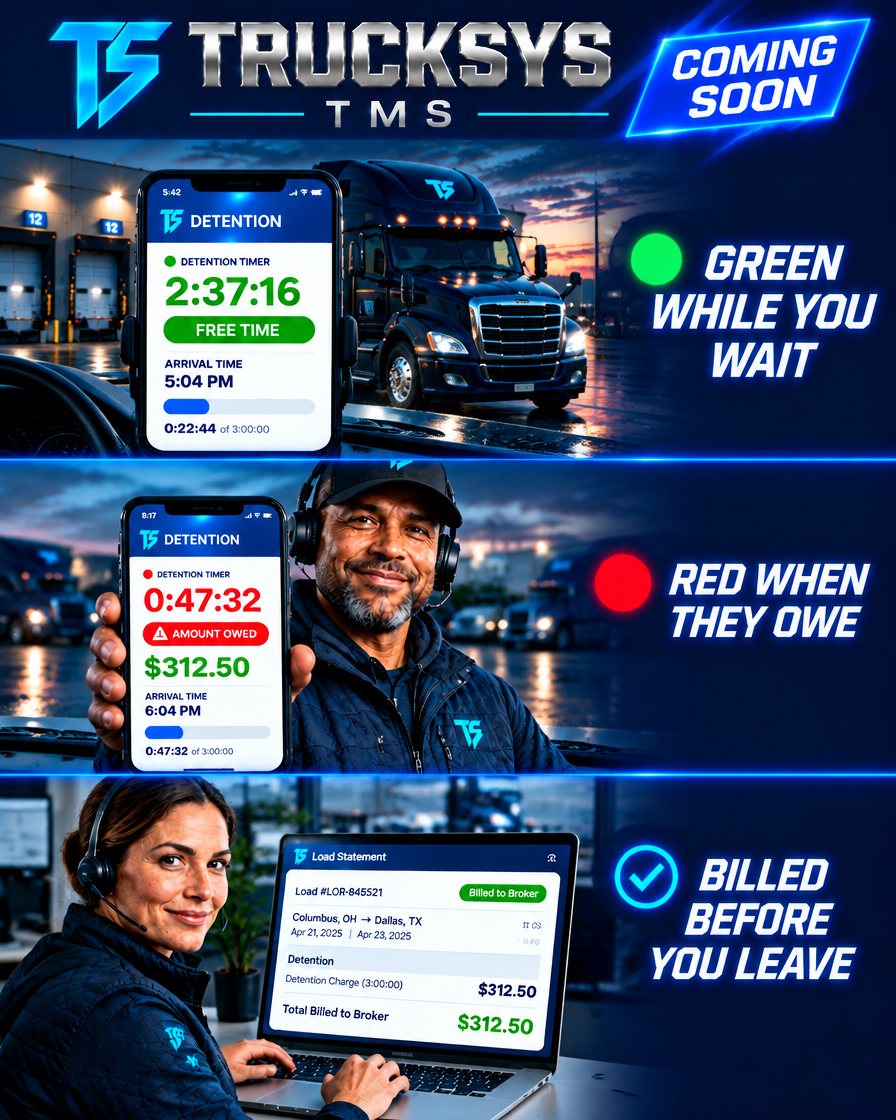
Green while you wait. Red once it is billable.

Tap arrive. The timer runs green through your free time and turns red the moment it’s spent, with the amount owed on screen before you’ve pulled off the dock.

  • Arrival and departure time-stamped, not remembered
  • Free time set per broker, so the clock matches the rate con
  • The charge calculated as it runs — no working it out afterwards
  • Photos and documents attached to the claim

Detention you can’t prove is detention you don’t get paid.

The detention timer running green inside free time, red once it is spent, and the finished charge billed to the broker on a load statement

The bill is ready before you leave

When the load closes, the detention is already on the statement with the times, the hours over and the charge — the paperwork you’d otherwise be arguing without.

A driver at a truck stop holding up the Trucksys detention screen showing the running timer, arrival time and free time remaining

Lease & lease-purchase

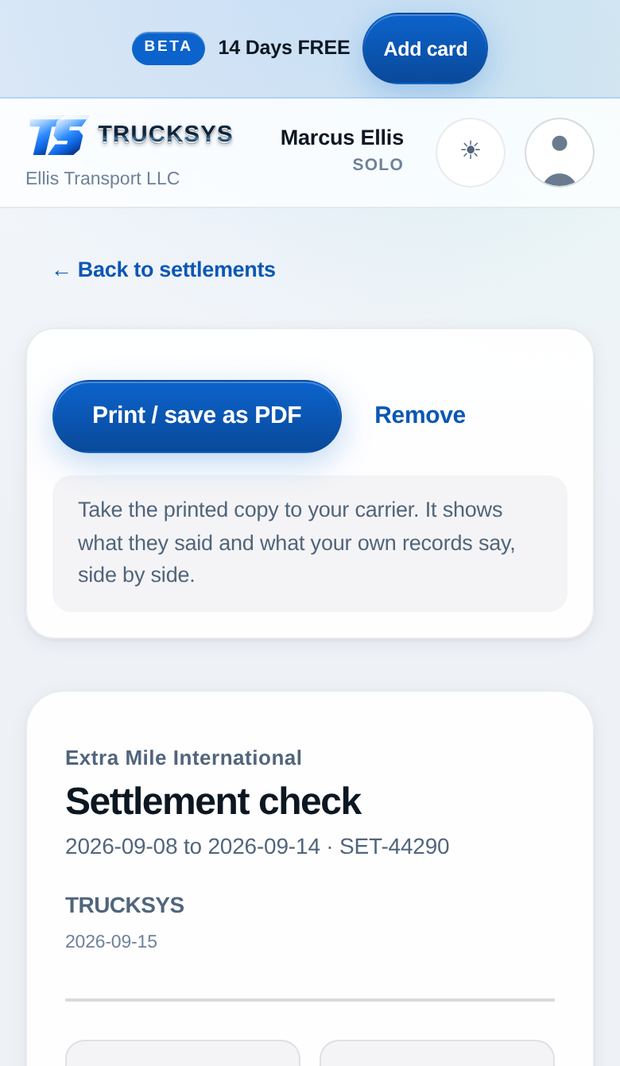
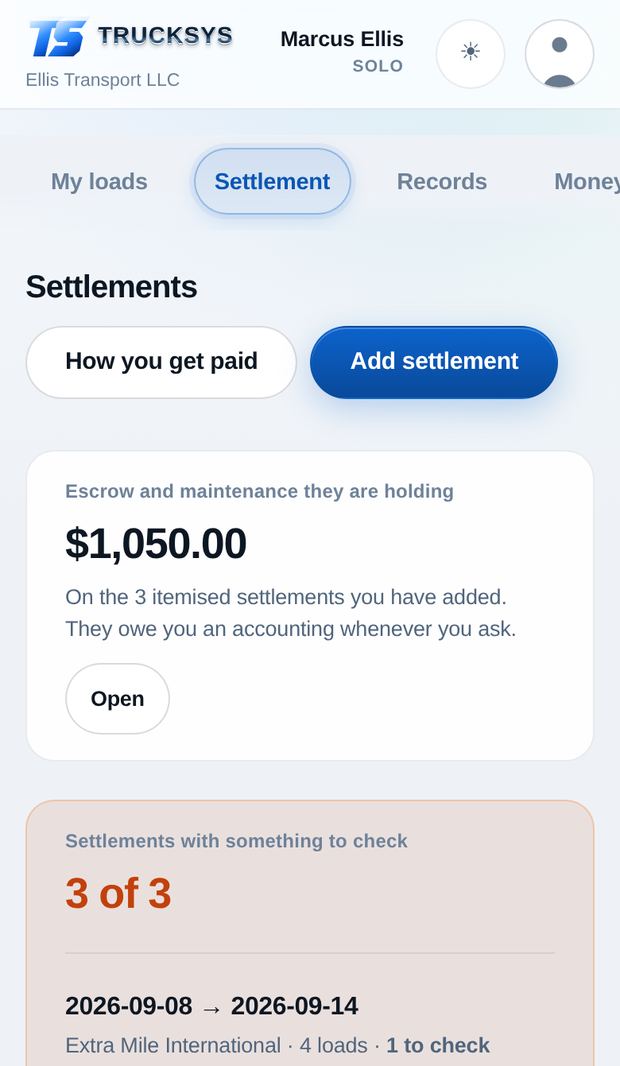
Your settlement, checked line by line

Your settlement, next to your own record of the week — the loads you ran, the miles, the detention your clock caught and the receipts in your pocket. Two columns and the arithmetic between them.

It reads the settlement and lines it up against your week

Photograph the statement. Trucksys pulls out every pay line and every deduction, then checks them against your own record of the week.

  • Loads you delivered that never made it onto the statement
  • Detention your clock recorded that never reached the statement
  • Fuel charged above the receipts you have paper for
  • Deductions bigger than the figure you wrote down
  • Lines that do not add up to the gross

It never prints a number it cannot support. When the data is thin it says so instead of guessing — a wrong figure in a conversation about money is worse than none.

Settlement list showing which weeks have something to check

Escrow, totalled and accounted for

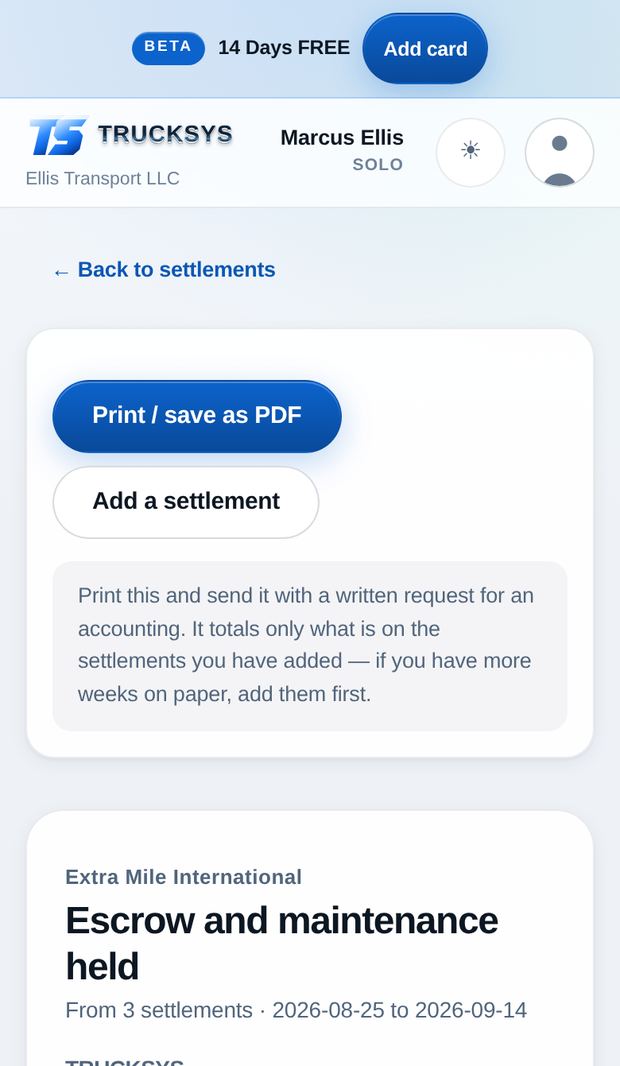
Every escrow and maintenance-reserve line across every settlement you have added, kept in one running total — with the federal rule printed underneath it.

  • 49 CFR 376.12(k) entitles you to an accounting whenever you ask
  • It must come back within 45 days of the lease ending
  • The interest is yours
  • Prints as a document you can hand over or send

It says on its face that it is your record, not theirs, and what it was built from. So nobody can wave it away.

The escrow and maintenance record with the 49 CFR 376.12(k) demand text

Your paperwork, kept on your own side

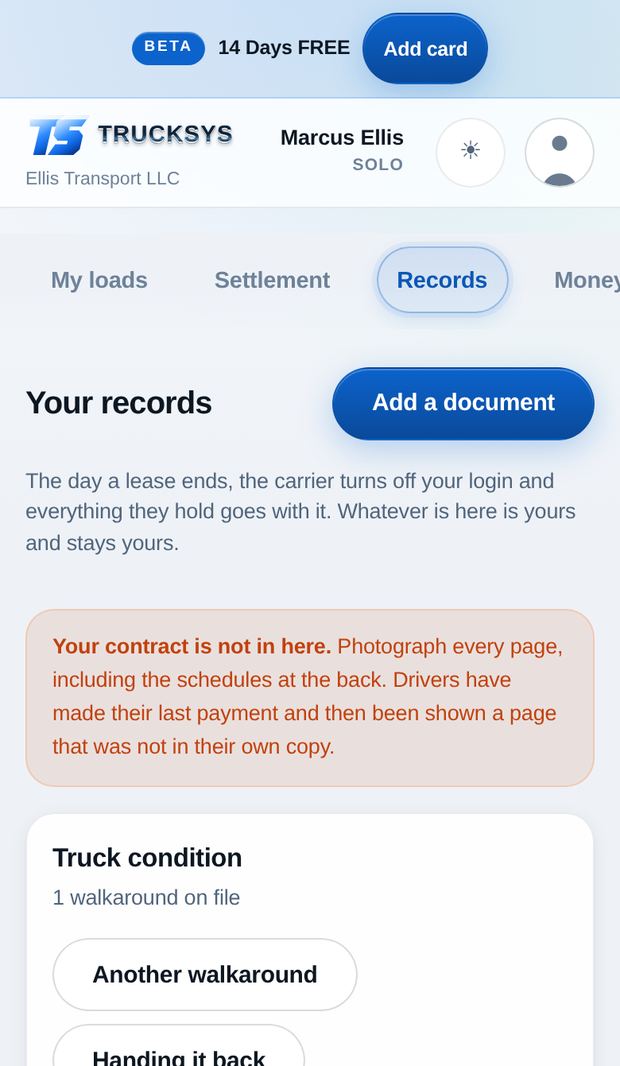
When a lease ends, access to the carrier’s portal ends with it, and anything you only ever had in there goes too. Whatever is in here is yours and stays yours.

  • Your lease contract, every page including the schedules
  • Settlements, escrow statements, repair orders
  • A guided truck walkaround — ten named positions, odometer, tread depth
  • It tells you which positions you skipped, because a missing photo is what gets charged for later
The records screen with the contract prompt and the truck condition walkaround

Owner-operators

Loads out, money in, nothing dropped

The whole week on a phone, in the cab, without a laptop or a dispatcher.

Photograph the rate con. It fills the load in.

Both addresses, the appointments, the facility phone numbers, the rate, free time and the detention rate — read off the document and filled in for you.

  • Tap Arrive at the receiver and the detention clock starts
  • Green while your free time runs, red the moment it is billable
  • BOL and POD photographed against the load, not lost in your camera roll
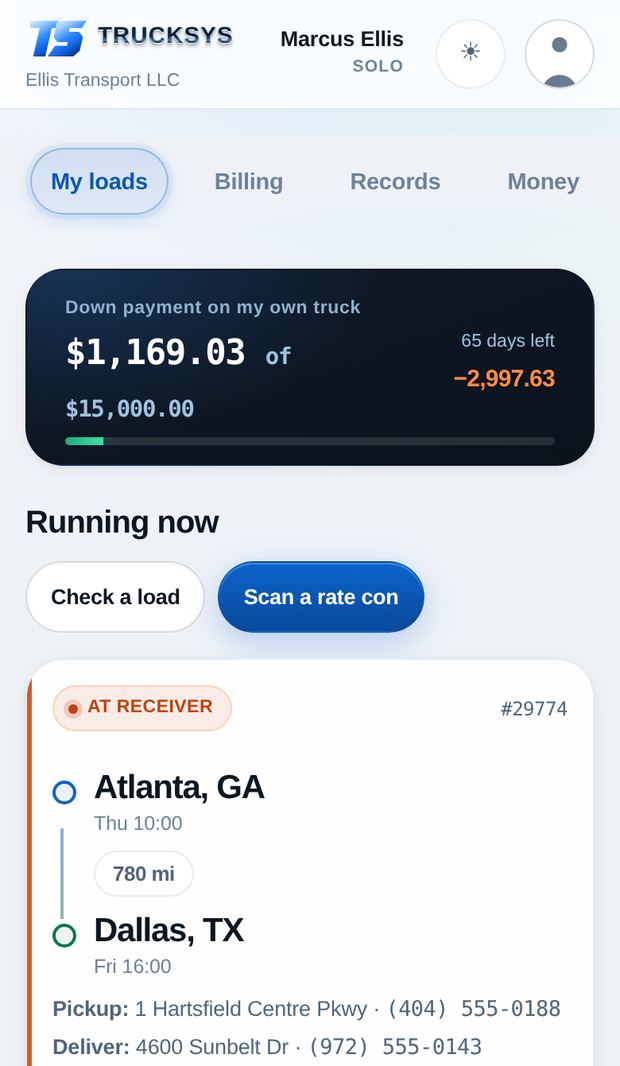
The loads screen with a live load and the rate con scanner

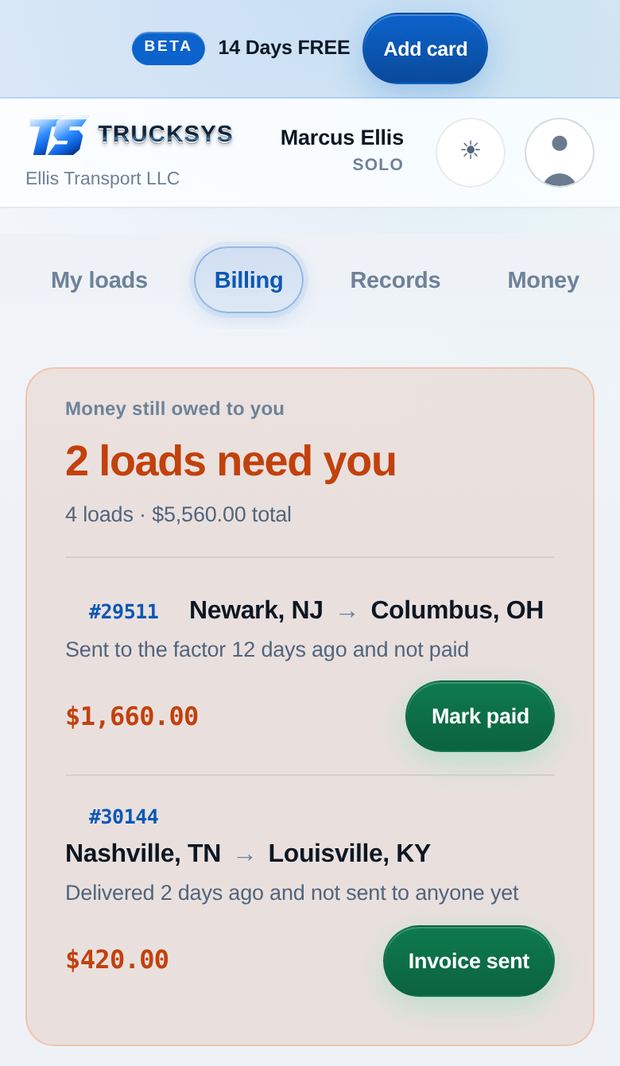
Every load: invoiced, factored, paid — or chasing you

An invoice packet with the BOL and the rate confirmation behind it, ready to print or send from your own email. Then it keeps score until the money lands.

  • Detention rides on the invoice instead of being written off
  • Loads delivered and never invoiced come back at you
  • Mark it factored the day you send it — nothing slips through
  • Ages quietly from a nudge to a warning as it goes unpaid
The billing screen showing loads that need invoicing or chasing

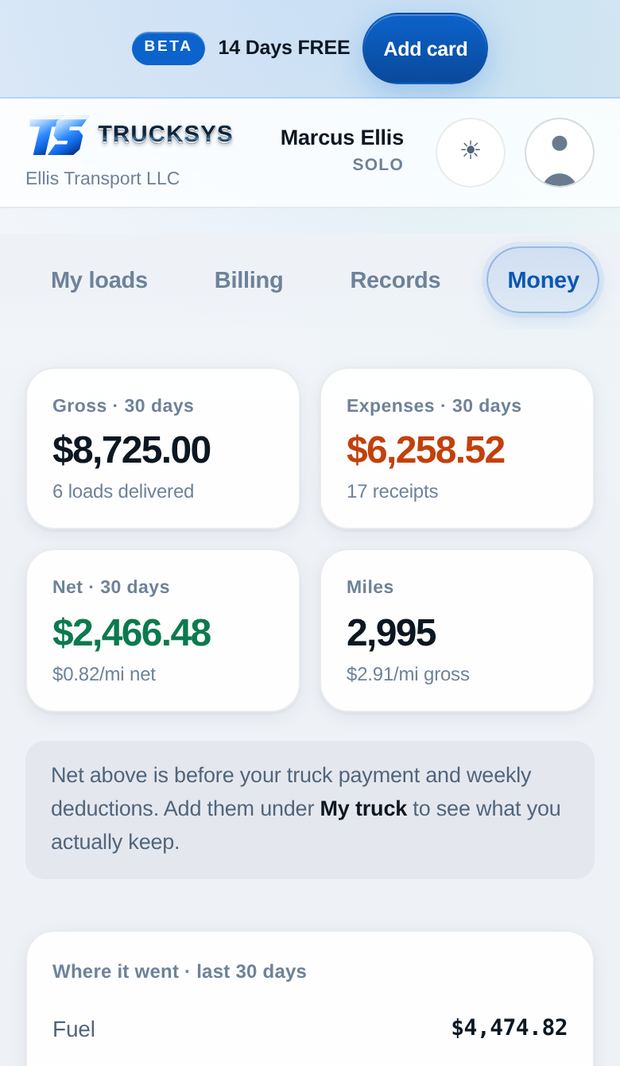
What the week actually kept

Gross, fuel, expenses, cost per mile and real net — from receipts you photographed at the pump, not from a spreadsheet you meant to fill in on Sunday.

  • Truck payment and weekly deductions come off only when you switch them on
  • Set a savings goal and watch it against the weeks you are actually running
  • Export any of it to its own sheet, ready for your accountant
The money screen with gross, expenses, net and cost per mile

Know your weekly numbers, and which lanes made them

Every week: what you booked, the miles, your rate per mile and what you actually earned — then the same figures broken out by truck and by lane.

  • Your strongest lane and your worst one, averaged across every run — not one lucky load
  • Which market you load out of best, so you know where to look tomorrow
  • Rate per mile figured on the rate and the loaded miles, never on your cut
  • Running totals that keep going — week, month, and every load you have ever run

A lane has to run twice before the app calls it a lane. One good load is not a market, and pretending otherwise is how a bad week gets repeated.

The weekly figures broken out by truck and by lane

One real week

What it found on one driver’s settlement

A lease-purchase driver’s week, run through the check. His name is changed and the figures are not. This is one week on one truck — not a promise about yours.

David · lease-purchase, one truck Settlement checked against his own loads, receipts and clock

Detention never paidSat the dock, the hours were never billed

$338

Fuel charged above his receiptsCarrier’s number did not match the pump

$97

Settlement lines that did not add upDeductions against the contract he signed

$224

Tolls billed twiceChecked against the route he actually ran

$17

Found in one week

$676

Twenty-three weeks of the subscription, found in one

None of it was hidden. It was all sitting in the difference between what the statement said and what his own records said — which is exactly the comparison nobody has time to do by hand on a Friday night.

The app does not accuse anybody. It shows you the two columns and the arithmetic between them.

An owner-operator at a truck stop at dusk with the Trucksys week open on his phone

Who builds this

Built by drivers and owners, for drivers and owners

I drive. I have run leased on and I have run my own authority, and I have sat at a dock for four hours and never billed a minute of it because nobody wrote the times down. Every small carrier I know runs on a spreadsheet, a notebook and a phone full of photographs. I could not find software priced for that man, so I built it.

It is tested on my own loads before it goes anywhere near yours. When a number in here is wrong, it is wrong on my settlement first.

Kevin — founder, and still driving Detroit, Michigan

Getting started

Running tonight, not next quarter

Nobody migrates your data, because there is nothing to migrate. You photograph last week’s statement and the app has something to check within a few minutes.

STEP 01

Tell it how you get paid

Cents per mile, a percentage of gross or of linehaul, or a flat rate — plus your fixed weekly deductions if you have them.

  • Two minutes, once
  • No contract needed
  • Any settlement week start
STEP 02

Photograph last week

The settlement, the rate cons, the fuel receipts. It reads them, pulls out the lines and files them against the right loads.

  • Phone camera, nothing else
  • Rate cons fill the load in
  • Receipts land on the week
STEP 03

Read what disagrees

The two columns side by side with the arithmetic shown, and a list of what does not match — in dollars, ready to ask about.

  • Same evening
  • Export or screenshot it
  • Nothing sent to your carrier
$0To run both calculators — no account, no card
14Days free on everything. No card to start.
1Truck is a real customer here, not a rounding error
0People at your carrier can see your records

CHEAPER THAN YOUR FAVORITE TMS

Pricing

Fourteen days free with everything switched on. No card to start — sign up and the fourteen days begin. Add a card when they run out, or do not, and your records stay readable either way.

New · Company drivers

Company Driver

$29
$19.99/month

You pay less than a lease driver — save $9 every month.

Drive the company’s truck? Know your check before it lands, catch short pay, and save for what’s next.

Start 14 days free
  • Your projected check, updated with every load
  • Settlement check — catch short pay line by line
  • Detention clock at every stop
  • Cash advances, deductions and road expenses tracked
  • Savings goal — 30, 90 or 365 days, your call
  • Rate con scanning and the free fuel calculator

Solo

$29/month
UNLIMITED USERS

One truck. Lease, lease-purchase or your own authority.

  • Settlement check and escrow record
  • Rate con, BOL and POD scanning
  • Detention clock and accessorials
  • Invoicing and the factoring chase
  • Expenses, fuel, real net, exports
  • Document vault and walkarounds
Start 14 days free

Fleet

$99/month
UNLIMITED USERS

Two to four trucks.

  • Everything in Solo
  • Driver logins, rates stay hidden from them
  • Assign loads, trucks and trailers
  • Arrival and departure stamped at both stops, on every load
  • Receipts and reimbursements to approve
Start 14 days free

Fleet 10

$199/month
UNLIMITED USERS

Five to ten trucks.

  • Everything in Fleet
  • Dispatcher logins, siloed from each other
  • Per-dispatcher pay and performance
  • Maintenance, inspections and violations
Start 14 days free

WHY PAY PER SEAT

Every plan comes with unlimited logins — owners, managers, dispatchers and drivers, as many of each as you need. You are billed on the trucks on your account, and that includes the ones you only dispatch for somebody else. Flat per band, not per truck — a fifth truck does not change your bill.

Why one truck costs so much everywhere else

Fleet TMS pricing is built around a ten-truck minimum. Published rates, September 2026.

Running one truckTrucksysFleet TMS
What one truck costs a month $29 $300 minimum, covering 10
Getting started Sign up, photograph a statement Book a demo, then a migration
Who the price is built for One truck, up to ten A yard with ten in it
Checks a settlement against your own records Yes No
Free trial 14 days, everything on 14 days, everything on

Comparison is against published fleet-TMS list pricing for carriers. They are good products — they are simply priced for a yard with ten trucks in it.

Straight answers

Will my carrier see that I am using this?

No. Your account is yours. Nothing is sent to a carrier, a broker or a factor, and there is no public database of anybody’s findings. What the app finds stays between you and your phone.

Do my drivers see what a load paid?

Never. Rates, broker names and margin are walled off in the database itself, not merely hidden in the screens — a driver cannot reach them even from outside the app. Drivers see the addresses, the appointments and the facility phone number, which is what they need.

Do I need an ELD, or a subscription to anything else?

No. Nothing to download and nothing to install — it opens on the phone, tablet or laptop you already have, and your records are on all three the moment you save them. No app store, no updates to chase, no waiting on a release.

What if I have no contract, or a handshake deal?

That is most of the market now, and the app is built for it. Enter how you are paid — cents per mile, a percentage of gross or of linehaul, or a flat rate — and it checks the settlement against that. No paperwork required on your end.

What happens to my records if I stop paying?

You can always read and export everything you put in. That never gets locked behind the subscription — the whole point of the app is that your records stay yours.

What happens when the numbers do not match?

It shows you both columns and the difference, in dollars. Most of the time it is a keying mistake, a charge you agreed to and forgot, or a rate that changed after the load was booked. The app does not accuse anybody of anything — it does the arithmetic and leaves the conversation to you.

Check one settlement

That is the whole pitch. Photograph last week’s statement and see whether it agrees with your own record of the week.